Working with Numbers
So we looked at strings and the properties and methods that are available to us. Now let's look at numbers. We'll also look at the Math object.
Like with strings, when we add a method to a number, a new number object is created and we can use that object to call the method. Let's create the object ourselves to see the available methods in the prototype
const num = new Number(5);
console.log(num)
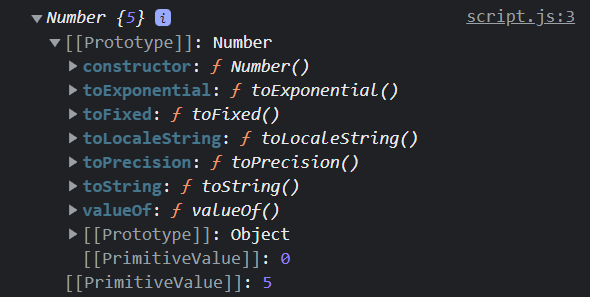
toString()
Returns a string representation of the number
num.toString(); // "5"
Number types and objects do not have a length property. If you want to find the length, one thing that you could do is convert it to a string and then use length
num.toString().length; // 1
toFixed()
Returns a string representation of the number with a specified number of decimals
Let's assume num is equal to 5 right now
num.toFixed(2); // 5.00
num.toFixed(1); // 5.0
toPrecision()
returns a number with the specified length
const num2 = 94.4058;
num.toPrecision(3); // 94.4
toExponential()
Returns a string representation of the number in exponential notation
num.toExponential(2); // "5.00e+0"
toLocalString()
Returns a string representation of the number in the current locale
let num = 5000000;
num.toLocalString(); // "5,000,000"
It defaults to the browser's locale, which for me is "en-US", but let's say we want to use India's locale
num.toLocalString('en-IN'); // "50,00,000"
Number Object Properties & Values
The Number object has a few properties and methods that are available.
Max Value
Largest possible value of a number
Number.MAX_VALUE; // 1.7976931348623157e+308
Min Value
Smallest possible value of a number
Number.MIN_VALUE; // 5e-324
There are methods as well. For instance, we already looked at isNaN(), which will tell us if the value is actually NaN
Number.isNaN(NaN); // true